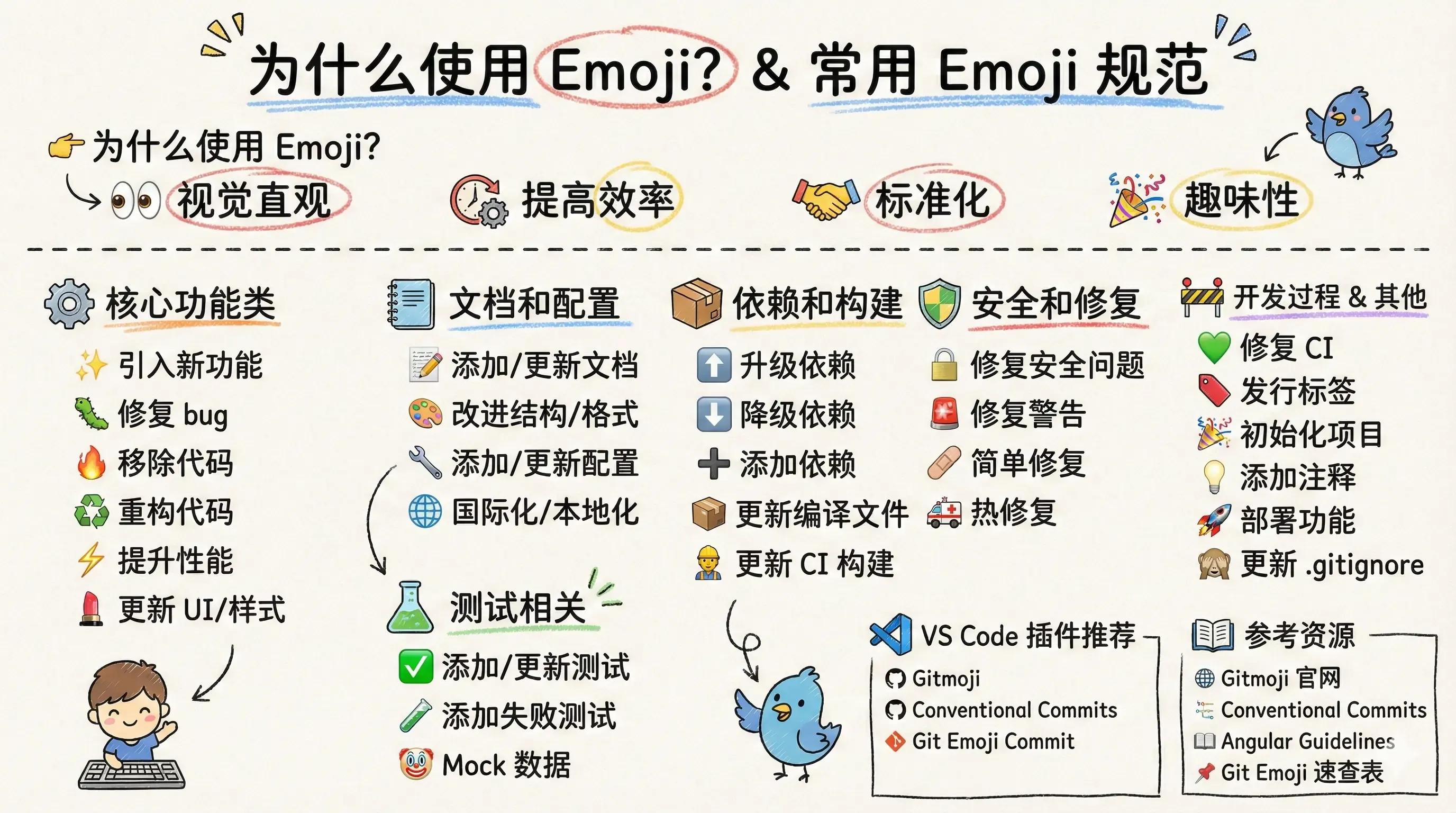
 Article Summary Image
Why Use Emojis?
Using emojis in commit messages offers several advantages:
- Visual Intuition - Identify commit types at a glance.
- Improved Efficiency - Quickly understand project history.
- Standardization - Maintain consistency across team collaborations.
- Engagement - Makes monotonous commit logs more vivid and fun.
Common Emoji Standards
1. Core Functions
| Emoji | Code | Description | Example |
|---|
| ✨ | :sparkles: | Introduce new features | ✨ Add user login functionality |
| 🐛 | :bug: | Fix a bug | 🐛 Fix navigation bar display on mobile |
| 🔥 | :fire: | Remove code or files | 🔥 Delete deprecated legacy API |
| ♻️ | :recycle: | Refactor code | ♻️ Refactor user authentication module |
| ⚡️ | :zap: | Improve performance | ⚡️ Optimize image loading speed |
| 💄 | :lipstick: | Update UI and style files | 💄 Adjust button styles and colors |
2. Documentation & Configuration
| Emoji | Code | Description | Example |
|---|
| 📝 | :memo: | Add or update documentation | 📝 Update API usage documentation |
| 🎨 | :art: | Improve structure/format of the code | 🎨 Format code and optimize imports |
| 🔧 | :wrench: | Add or update configuration files | 🔧 Update ESLint configuration |
| 🌐 | :globe_with_meridians: | Internationalization and localization | 🌐 Add English translations |
3. Testing
| Emoji | Code | Description | Example |
|---|
| ✅ | :white_check_mark: | Add or update tests | ✅ Add unit tests for user registration |
| 🧪 | :test_tube: | Add a failing test | 🧪 Add test cases for boundary conditions |
| 🤡 | :clown_face: | Mock data and testing | 🤡 Add API mock data |
4. Dependencies & Housekeeping
| Emoji | Code | Description | Example |
|---|
| ⬆️ | :arrow_up: | Upgrade dependencies | ⬆️ Upgrade React to v18 |
| ⬇️ | :arrow_down: | Downgrade dependencies | ⬇️ Downgrade Node version for compatibility |
| ➕ | :heavy_plus_sign: | Add a dependency | ➕ Add Axios dependency |
| ➖ | :heavy_minus_sign: | Remove a dependency | ➖ Remove unused lodash |
| 📦 | :package: | Add or update compiled files/packages | 📦 Update build configuration |
| 👷 | :construction_worker: | Add or update CI build system | 👷 Add GitHub Actions workflow |
5. Security & Fixes
| Emoji | Code | Description | Example |
|---|
| 🔒 | :lock: | Fix security issues | 🔒 Fix XSS vulnerability |
| 🚨 | :rotating_light: | Fix compiler/linter warnings | 🚨 Fix TypeScript type errors |
| 🩹 | :adhesive_bandage: | Simple fix for non-critical issues | 🩹 Fix console warning messages |
| 🚑 | :ambulance: | Critical hotfix | 🚑 Emergency fix for production crash |
6. Development Process
| Emoji | Code | Description | Example |
|---|
| 🚧 | :construction: | Work in progress | 🚧 Implement payment feature (WIP) |
| 💚 | :green_heart: | Fix CI Build | 💚 Fix CI test failures |
| 🔖 | :bookmark: | Release / Version tags | 🔖 Release v1.2.0 |
| 🎉 | :tada: | Initial commit / Project start | 🎉 Initialize project structure |
| 🗃️ | :card_file_box: | Database related changes | 🗃️ Add index to user table |
7. Others
| Emoji | Code | Description | Example |
|---|
| 💡 | :bulb: | Add or update source code comments | 💡 Add comments for complex algorithms |
| 🔊 | :loud_sound: | Add or update logs | 🔊 Add detailed error logs |
| 🔇 | :mute: | Remove logs | 🔇 Remove debugging logs |
| 🚀 | :rocket: | Deploy stuff | 🚀 Deploy to production environment |
| 👽 | :alien: | Update code due to external API changes | 👽 Update to adapt to new Google Maps API |
| 🍱 | :bento: | Add or update assets | 🍱 Add product images and icons |
| ♿️ | :wheelchair: | Improve accessibility | ♿️ Add ARIA labels for accessibility |
| 🥚 | :egg: | Add or update an easter egg | 🥚 Add Konami Code easter egg |
| 🙈 | :see_no_evil: | Add or update .gitignore | 🙈 Ignore .env files |
Recommended VS Code Extensions
- Gitmoji - Provides an emoji selector for commits.
- Conventional Commits - Standardizes commit message formats.
- Git Emoji Commit - Quickly insert emojis into your workflow.